Why Getting Full Swing Golf Simulator Room Dimensions Right Is Everything
Full swing golf simulator room dimensions are the single most important factor to plan before buying or building an indoor simulator. Get them wrong and you’re looking at restricted swings, inaccurate data, or worse — a launch monitor that simply won’t work in your space.
Here’s the quick answer:
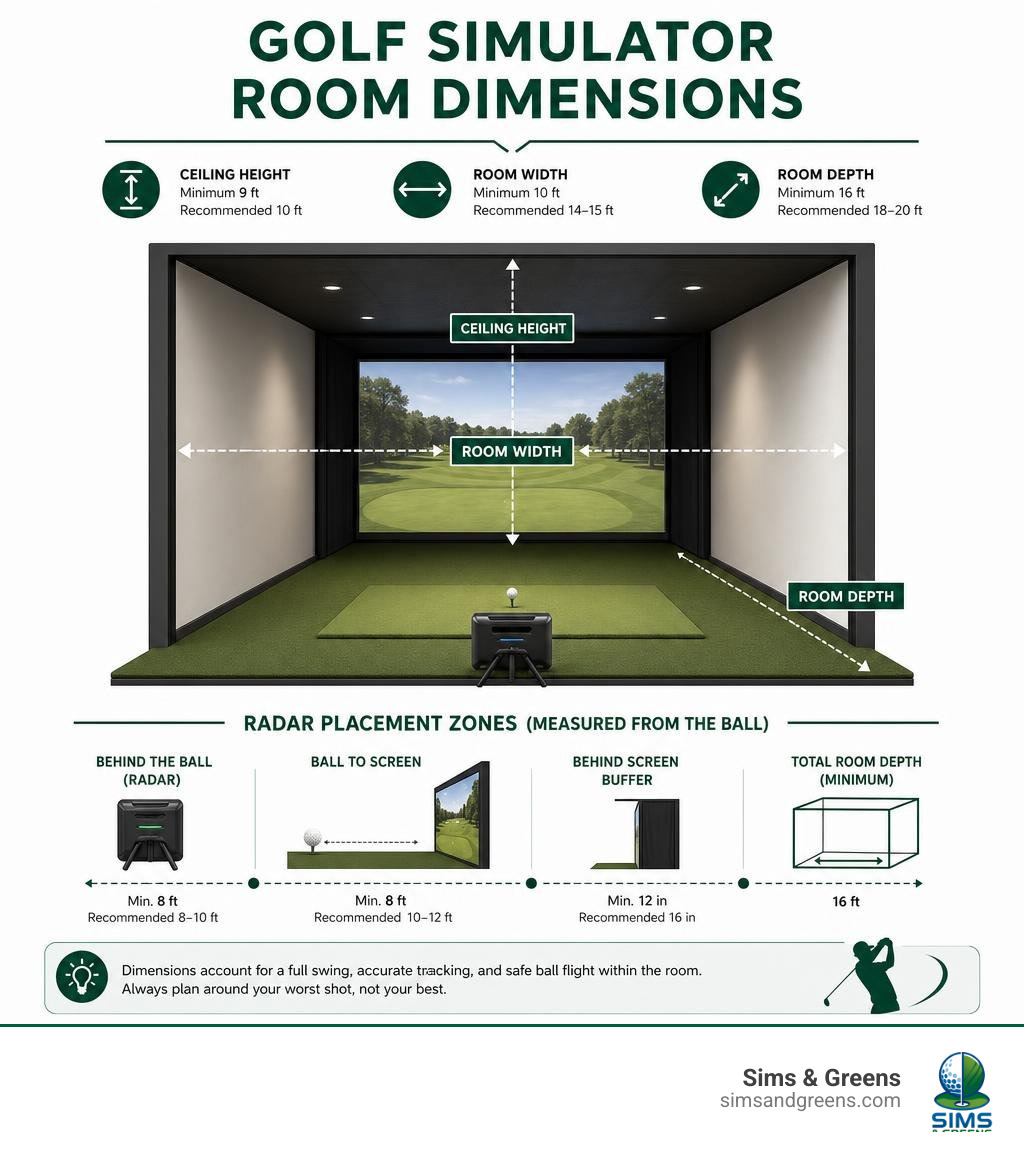
| Dimension | Minimum | Recommended |
|---|---|---|
| Ceiling Height | 9 ft | 10 ft |
| Room Width | 10 ft | 14–15 ft |
| Room Depth | 16 ft | 18–20 ft |
| Behind the Ball (radar) | 8 ft | 8–10 ft |
| Ball to Screen | 8 ft | 10–12 ft |
| Behind Screen Buffer | 12 in | 16 in |
These numbers apply specifically to radar-based systems like the Full Swing KIT. If your room is shallower than 16 feet total, a camera-based monitor may be a better fit — more on that below.
One of the most common mistakes golfers make is planning around their best shot instead of their worst. A shank in a tight space with no side containment isn’t just an annoyance — it’s a safety hazard. Depth, width, and ceiling height all need to account for the full range of your swing, not just the clean 7-iron you hit in your head.
I’m Gary Wilder, founder of Sims & Greens, and with 8 years of hands-on golf simulator installations — including working with tour-level players — I’ve planned dozens of setups around full swing golf simulator room dimensions in spaces ranging from tight single-car garages to dedicated luxury bays. The guidance below is drawn directly from that experience so you can plan your space with confidence.
Understanding Full Swing Golf Simulator Room Dimensions
When we talk about setting up a premium golf simulator room, we have to look at the three-dimensional envelope of your space: ceiling height, room width, and room depth. Each of these parameters directly impacts your swing mechanics, the safety of your home, and the accuracy of your tracking hardware.
If you’re planning to use the Tiger Woods-backed Full Swing KIT, you are dealing with a highly sophisticated radar-based system. Unlike camera-based units that sit directly to the side of your ball, radar units must sit behind you. This means that your physical room dimensions dictate whether the technology can function at its peak. Before diving into the build, we highly recommend reviewing the Full Swing KIT Launch Monitor Space Requirements to understand the hardware footprint.
Minimum vs Recommended Full Swing Golf Simulator Room Dimensions
Let’s break down the physical space requirements to understand the difference between “making it fit” and “swinging with absolute freedom.”
- Ceiling Height: The absolute minimum ceiling height for a golf simulator is 9 feet. However, at 9 feet, tall players or anyone with a steep swing plane will experience “ceiling awareness” — a subconscious, defensive shortening of the swing to avoid hitting the ceiling. The gold standard is 10 feet. At 10 feet, you can swing a driver freely without a second thought.
- Room Width: While 10 feet is the absolute physical minimum width, it forces you into an offset hitting position (where you must stand off-center to avoid hitting the back wall on your takeaway). To center the hitting mat — which is essential if you want both right- and left-handed players to use the space — you need a recommended width of 14 to 15 feet.
- Room Depth: Do not confuse your hardware footprint with your actual room depth. While the physical components might only span 13 to 14 feet, a realistic and safe swing zone requires a minimum of 16 feet of depth, with 18 to 20 feet being the recommended ideal.
If you are brainstorming how to lay out your space, you can find More info about golf simulator room ideas to help visualize your build.
Space Requirements Behind and in Front of the Ball
Because the Full Swing KIT utilizes advanced radar tracking, it requires two distinct zones of space to capture accurate data:
- Behind the Ball (Radar Placement): The Full Swing KIT must be positioned exactly 8 to 10 feet behind the ball. This distance allows the radar’s tracking beam to fully expand and capture the club head and initial ball launch.
- In Front of the Ball (Ball Flight Tracking): The ball needs at least 8 feet of free flight before hitting the impact screen. If you reduce this distance, the radar won’t have enough data points to accurately calculate spin rates, launch angles, and carry distances.
When you purchase complete packages, such as the KIT Studio Packages, these critical distances are pre-engineered into the enclosure designs, ensuring your launch monitor performs exactly as intended.
Radar vs Camera Launch Monitors: Depth and Space Requirements
One of the most critical decisions in planning your indoor golf studio is choosing between a radar-based system (like the Full Swing KIT) and a camera-based system (such as a Foresight GC3 or SkyTrak+). The choice between these technologies is almost entirely driven by your available room depth.
| Feature / Requirement | Radar-Based (e.g., Full Swing KIT) | Camera-Based (e.g., GC3, SkyTrak+) |
|---|---|---|
| Launch Monitor Placement | 8–10 feet behind the golfer | 18–20 inches directly beside the ball |
| Minimum Room Depth | 16–18 feet | 15 feet |
| Ideal Room Depth | 18–20 feet | 16–17 feet |
| Mixed Handedness Play | Excellent (no need to move the device) | Requires shifting the unit for lefties |
| Outdoor Performance | Outstanding (tracks full ball flight) | Limited (sunlight can interfere with cameras) |
If you are still weighing which enclosure style fits your chosen technology, read our guide on Understanding Golf Simulator Enclosure Dimensions and Space Requirements to see how these systems integrate.
How Radar Technology Impacts Full Swing Golf Simulator Room Dimensions
Radar launch monitors track the physical movement of the ball over time. To deliver the precise, tour-level data that Full Swing is known for, the radar needs to “see” the ball travel through the air.
If your room is too shallow (for example, only 14 feet deep), you will be forced to place the radar closer to the ball, or place the ball closer to the screen. If the ball is too close to the screen, the radar only gets a microsecond of flight data. In these scenarios, the launch monitor has to estimate your spin rates and carry distances, which can lead to highly inaccurate numbers. For a premium, high-fidelity experience, honoring the depth requirements is non-negotiable.
Optimizing Enclosures, Aspect Ratios, and Safety Clearances
Once you have verified your room dimensions, the next step is selecting the right enclosure and screen. Your enclosure does more than just hold the screen; it frames your view, keeps stray shots contained, and determines the overall visual immersion of your simulator.
The aspect ratio of your screen — typically 4:3 or 16:9 — will dictate how you utilize your room’s width and height:
- 4:3 Aspect Ratio: This is the most popular choice for home simulators because it maximizes screen height relative to room width. If your room has limited width but great ceiling height, a 4:3 screen fills the space beautifully.
- 16:9 Aspect Ratio: This widescreen format offers the ultimate cinematic experience. However, to display a 16:9 image without awkward black bars, your room needs to be at least 15 to 16 feet wide.
To explore premium, high-end layouts that utilize these ratios, check out More info about elite home golf simulators to see what is possible.
Safety Clearances and Screen Rebound Prevention
Safety is the absolute foundation of any indoor golf build. When a ball leaves your driver at 150+ mph, there is zero room for error.
- Behind-Screen Buffer: Never place your impact screen directly against a wall. You must leave at least 12 inches (ideally 16 inches) of dead space behind the screen. When the ball hits the screen, the fabric flexes. If it strikes the wall behind it, the ball will rebound back at the golfer at dangerous speeds.
- Side Netting and Wall Padding: Even the best golfers hit the occasional shank. Side wall protection is mandatory. We recommend using 3 lb memory foam or high-density polyurethane panels to absorb off-center strikes.
- Ceiling Protection: Wedge shots launch at incredibly high angles. Ensure your enclosure has a robust ceiling baffle or padded top panel to catch high-launching shots before they damage your ceiling drywall or lighting fixtures.
Best Practices for Indoor Radar Setup and Small Space Optimization
To get the absolute most out of your Full Swing KIT indoors, your setup must be meticulously calibrated. Indoor environments are filled with potential radar interference, but a few best practices will ensure your data remains flawless.
- Perfect Leveling: The Full Swing KIT must sit on the exact same vertical plane as your hitting mat. If your mat is 2 inches thick, you must raise the launch monitor by exactly 2 inches. If the unit is tilted or sitting lower than the hitting surface, it will struggle to read launch angles accurately.
- Minimizing Interference: Radar waves bounce off metal and spinning objects. Gym equipment, metal shelving, and running fans can create “radar noise” that interferes with your readings. Keep the zone between your launch monitor and the screen clear of metallic obstructions.
- Using Titleist RCT Balls: In confined indoor spaces, standard golf balls don’t spin enough times before hitting the screen for the radar to measure exact spin. Titleist Radar Capturing Technology (RCT) balls feature internal metallic markings that reflect the radar signal, allowing the Full Swing KIT to capture precise spin data in a fraction of the distance.
If you are looking for a complete overview of the latest home tech, you can read More info about home golf simulators in 2026 to stay ahead of the curve.
Converting Garages, Basements, and Sheds
Here in the Tampa Bay area — from the historic homes of South Tampa to the coastal properties in Clearwater, Belleair, and St. Petersburg — we frequently convert garages and custom-built outdoor spaces into luxury golf sanctuaries.
When converting these spaces, keep these structural challenges in mind:
- Garage Conversions: A standard two-car garage (typically 18–22 feet wide and 20–24 feet deep) is the absolute perfect canvas for a simulator. However, you must watch out for overhead garage door tracks and openers. These often hang down to 7 or 8 feet, directly intersecting your swing path.
- Basements and Support Columns: If you are lucky enough to have a basement in Florida, watch out for structural support columns and low-hanging HVAC ductwork. Always measure to the lowest physical obstruction, not the ceiling drywall.
- Shed and Outbuilding Dimensions: If you are building a custom backyard golf shed, you have the luxury of designing the footprint from scratch. For a complete guide on designing these standalone structures, read More info about golf shed dimensions.
Frequently Asked Questions About Golf Simulator Spaces
What is the absolute minimum ceiling height for a Full Swing KIT?
The absolute minimum ceiling height is 9 feet, but this is only functional if you measure to the lowest hanging obstacle (such as a garage door track or light fixture). For a comfortable, unrestricted swing with a driver, 10 feet is highly recommended.
Can I set up a Full Swing simulator in a single-car garage?
Yes, but it is tight. A standard single-car garage is typically 12 feet wide. This is wide enough for a safe swing, but you will be forced to use an offset hitting position (standing closer to one side). Additionally, a single-car garage will only accommodate one dexterity (either right-handed or left-handed play) without moving the entire setup.
Why are Titleist RCT balls recommended for indoor radar setups?
Radar units need to see a ball rotate to measure spin. In an indoor setting with only 8 to 10 feet of ball flight, a standard ball may not complete enough rotations. Titleist RCT balls have special internal radar-reflective patterns that allow the Full Swing KIT to calculate exact spin rates instantly, even in limited-depth environments.
Conclusion
Planning your full swing golf simulator room dimensions is the most critical step in creating a safe, accurate, and highly immersive indoor golf experience. By ensuring you have the proper ceiling height, width, and depth, you protect your home, your equipment, and your swing mechanics.
At Sims & Greens, we specialize in designing and building luxury, turnkey home golf simulators, custom putting greens, and climate-controlled outdoor setups tailored specifically for homes across Pinellas and Hillsborough counties. Whether you are in Tampa, Dunedin, Oldsmar, Seminole, or down on the beaches from Madeira Beach to Tierra Verde, our team of experts is here to bring tour-level precision straight to your home.
Ready to take the next step? Build your dream golf simulator with us today and let’s craft the perfect indoor studio for your game.